It didn’t happen overnight. It crept in slowly. The way a room gets messier until one day you can’t find anything.
First, tweets became threads. A format built for brevity stretched into multi-part essays, because engagement algorithms rewarded length and click-through. Writers who had something real to say were forced to perform it in a format that wasn’t built for them.
Then the feeds went algorithmic. You stopped seeing what you chose to follow. You started seeing what platforms decided you should see — calibrated not for your curiosity, but for your outrage, your anxiety, your impulse to keep scrolling. The deliberate curation you’d built, the blogs you’d bookmarked, the writers you’d subscribed to were all quietly buried.
Content got commercialized. Every post became a funnel. Every newsletter became a pitch. Personal blogs quietly became brand strategy. Writing because you had something to say, without a conversion goal attached, started feeling almost quaint.
And then came the LLMs.
There are now over 600 million blogs on the internet. Seven and a half million posts are published every single day. And yet fewer than 10% of them generate any meaningful traffic. The irony is that never has more been written, and never has less of it said anything.
Readers are tired of it too.
The indie web is slowly staging a comeback. People are returning to personal sites, RSS readers, and hand-curated blogrolls — not out of nostalgia, but because the algorithmic feed has failed them. Studies show 83% of internet users still regularly read blogs. Newsletter platforms are seeing explosive growth in readers actively seeking out voices they trust — moving inside platforms to find writers, rather than waiting for algorithms to surface them.
The audience exists. It’s waiting for something worth reading.
The personal voice has become the scarcest resource on the internet.
Not because humans stopped having opinions — but because the dominant platforms trained us to sand them down. To optimize for reach. To ask “will this perform?” before asking “is this true?” The result is a vast, fast-moving river of content that sounds like everything and means nothing.
I know this because I’ve lived the alternative.
In 2013, after a Django talk at PyCon India, someone asked me whether the framework would ever adapt to Single Page Applications. I gave the best answer I could in the moment — which wasn’t a very good one. But the question wouldn’t leave me alone. A few days later, I sat down not to publish something impressive, but to figure out what I actually thought. I reached for analogies from my game programming days. I followed threads I wasn’t sure would go anywhere. I wrote honestly about Django’s genuine shortcomings, something a promotional post would never do. I wrote my way toward an answer I hadn’t had at the conference.
A PyCon attendee posted it to Hacker News. The next morning I woke up to find it sitting at #5 on the front page. I hadn’t optimized for anything. I’d thought out loud, honestly, in public. It turned out a lot of developers were sitting with the same unresolved question. That post is still one of the most-read things I’ve written. The patterns I worked out in it eventually found their way into my Django book.
No algorithm put it there. No content strategy. Just a question I couldn’t answer and the willingness to work through it in front of strangers.
A blog is where that kind of thinking lives. Not polished takes. Not hot angles engineered for sharing. The real thing: specific, from a specific person, in a way no language model can replicate because it comes from a life actually lived and a mind genuinely at work.
So this is me, restarting.
Not because blogging is trending. Not because I ran the numbers on organic reach. But because I have things to say that deserve more than 280 characters and less than an AI Overview.
If you’ve been sitting on a half-written post, an old blog that went quiet, or an idea you’ve been carrying around for months, then this is your signal.
The internet doesn’t need more content. It needs more you.
I used to think of Procrastination as a villain. If I had to complete a task before a deadline next week, I would not start work until the deadline gets uncomfortably close. The work ends up being more rushed than if I had used the entire week. Procrastination often robs the opportunity of producing better quality work.
I do not sense Procrastination as an urge or a feeling. It is rather the absence of the feelings like I need to start working on something. Frankly, it is also the knowledge that I could start but probably not now. To procrastinate is both a passive activity where I am not thinking about a task due for the future and an active choice to work on seemingly more urgent tasks due in the near future. Hence, a vicious circle.
As I get older, I realize that time is not as plentiful and readily available resource anymore. There are work and family commitments that leave only islands of time in my daily calendar. The ability to pull an all-nighter is not practical as you age since a sleep deficit cannot be easily overcome anymore. So delaying tasks often means unfinished tasks or lost opportunities. Procrastination has become a more urgent problem for me than ever.
But again, it is not accurate to always characterize Procrastination as a villain. There are times when I found delaying on a creative work helped me find better ideas than I would have if I had started earlier. ‘Sleeping on a problem’ can be surprisingly effective for finding a fresh perspective for complex issues. Most creative people do not progress at a steady rate instead they work in inspired sprints and take breaks in between.
So forcing oneself to work when your mind is not ready is not very useful. Is Procrastination our mind’s defense mechanism against attempting to solve poorly understood problems? Maybe. This is why there is no one-size-fits-all solution to everyone’s Procrastination problems.
But I will share some of my techniques below that have helped me solve this problem to a large degree.
Digital Minimalism
Most of us spend an incredible amount of time on our smartphones. Many apps are designed to hook you into spending the most amount of your time so that they can monetize it effectively. Watch out for such apps. In my experience these apps are of the following kinds:
Social networking apps: e.g. Facebook, Instagram, WhatsApp, Twitter. I have uninstalled most of them except WhatsApp and Twitter.
Entertainment apps: e.g. YouTube, Netflix, Amazon Prime, Games. I watch only highly recommended or very promising content. I set aside weekends and holidays for movies or longer shows.
News apps: e.g. Hacker News, Reddit, Newspapers. These are essential to keep myself updated but it is very easy to get lost in rabbit holes and doom scrolling.
Your list of apps might be different. Now most phones come with well being apps that tell you how many times and how long you use each app. Start from that and do a self evaluation of whether you want to spend so much time on each app. Turn off notifications from all apps except the ones you really, really need.
Today your time is a precious resource that must be protected from or mindfully shared with such apps. So it is not enough to practice self-control, you might need to modify your environment by uninstalling the least essential ones or time limit your access to such apps.
I saved a lot of time everyday by practicing digital minimalism. Procrastination is also reduced due to less availability of such easy time sinks.
There are a million TODO apps. They are all horrible. Because any digital device has a notification or a tempting app waiting for you even if you have followed my advice of turning off most notifications.
Paper is the best alternative. After trying all sorts of approaches I have settled on writing my daily TODO in a A5 size notebook. The hardest part is to build a daily habit of opening the notebook and groom your TODO list. But it is worth it.
Paper has the following advantages:
Avoids distractions: Remember taking your phone for noting down something, getting sidetracked into several apps and eventually forgetting why you took the phone in the first place?
Writing down helps remember: To me writing with a pen is slower than typing. But that deliberate process of writing helps me remember better than typing. Keeping TODO list items in your memory is important because most of the planning and replanning of everyday tasks happens in your head.
Spatial memory: Sometimes I remember that I wrote something 3 months back in my notebook and can recall specifics like it was on the left side, written in red ink or had a funny Peanuts doodle next to it. Sure it is not easily searchable by keywords. But the way my memory works, it is still retrievable and a lot more likely to be retained in my mind.
Fun and Creative: Try adding a funny doodle next to an item in a TODO app. Or try drawing the headline of an upcoming fun event in balloon letters. Paper has no limitations to your creativity. Check out galleries of Bullet Journalists. Some are probably procrastinating but a little bit of creativity is so inspiring.
Recommended Reading:
Bullet Journal - Basics - I use a slightly modified bullet journaling method to manage my TODOs
Timeboxing
Imagine you somehow manage to start working on a project several days in advance. One hour later, to your extreme frustration - the page is still blank. This paradox of having abundant time yet no progress can be understood if you know the Parkinson’s law - “work expands so as to fill the time available for its completion”.
I found the best way to tackle this problem is to use timeboxing. Take any project and break it down into clear and actionable tasks that have a limited time to complete. Some tasks might seem clear but could be complex and involve multiple steps. For example, “Write an Essay” can be split into “Research”, “Outline”, “Draft” and “Review” tasks.
Studies show that time-boxing is the most effective way to beat Procrastination. Just the act of dedicating time to a task ensures clarity and focus. I find the limited time aspect of time boxing to be simultaneously reliving and motivating. Since there is an internal deadline I have to meet, I avoid the trap of time abundance.
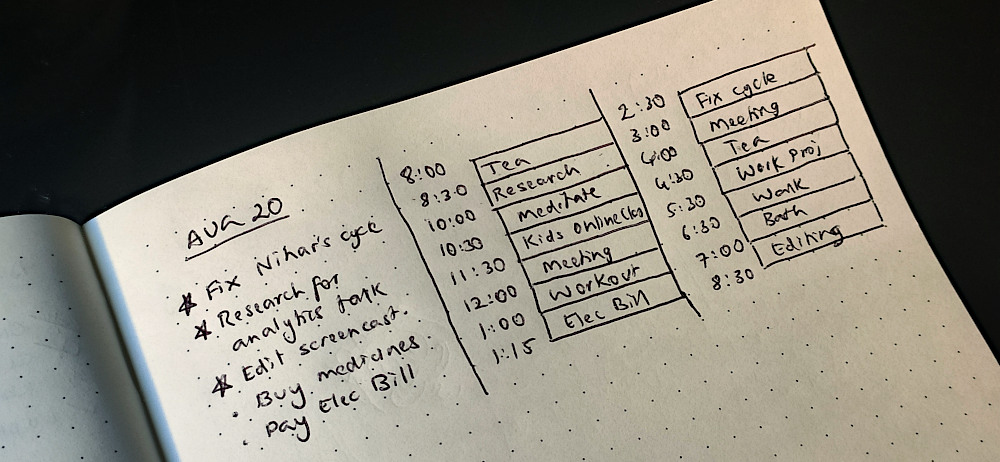
Here is how a day looks like with some dummy tasks in my bullet journal (Yeah I love to maximize space usage).
From my experience here are a number of Do’s and Don’ts to follow while time-boxing:
Don’t pack your day with work. Find ‘recharge time` in between tasks to recharge your batteries throughout the day. Coffee breaks, walks, meditation (more on that below), fooling around or simply sitting idle. I prefer 30 mins breaks between every 2 hours.
Don’t aim for a lot in one day. Stick to three significant tasks for the day. Everything else is a bonus.
Don’t be too rigid about the timings. Be flexible. They are boxes, they can be moved around!
Don’t be fixed in a spot or fixated on a device. Try a change of scenery every few minutes. For example, after 2 hours of working on the laptop, avoid taking a break by watching a video on the same screen.
Do revisit your old timeboxes. Improve your estimates by reflecting on older gues-stimates and comparing with the actual time
Do recognize your work. At end end of the day:
Tick off every task you finished to reward yourself for completing them.
Write down things you did but did not plan for. Then tick them off.
I have been practicing mindful meditation for the past 3 years. It has been extremely effective in reducing my habit of procrastinating. It is an effective tool with surprising real world benefits.
Like many people, I had a lot of misconceptions about mediation. There are many kinds of meditation. The vipassana approach of meditation that I follow is:
Non-religious - you are not chanting any mantras
Not about concentrating hard - although it may improve your focus, the goals are different.
Not time consuming - you can do just 10 minutes per day although I find 20 mins more effective.
Not done in a perfectly silent environment - it is possible to meditate in any environment. If noise is affecting you in the beginning, get noise cancelling headphones or earplugs.
It might not be clear how meditation is effective in managing your work. I found it helps me respond rather than react to situations. It is like a superpower to slow down time (QuickSilver?). Then I can pause and objectively evaluate the situation.
For example, I will begin to notice that feeling of anxiety when I think of cleaning my desk. It is due to the fact I don’t have my bookshelf organized to keep all the books lying around. Organizing my small bookshelf means donating some books and that means connecting with my bibliophile friend whom I haven’t spoken to in a while. Instead I decided to take a break (and relieve my anxiety) to watch a comedy special on Netflix. Sounds like a lot to unpack doesn’t it?
This brings us to the question that we never answered - Why do we procrastinate? Unlike what experts used to think, it is not a self-discipline problem. It is mostly an emotional problem. There are different kinds of procrastination like passive and active types. So it is important to introspect and understand what is blocking you. Mindfulness helps you immensely in identifying the root cause.
Procrastination should not be seen as the problem but a symptom. It needs to be addressed or it will start preventing you from reaching your goals. I have a few techniques that have worked for me over the last few years. I am reasonably productive following them diligently. Hope you will be too.
Some affiliate links are present in this article. Would not impact you but would help sustain the blog.
Have you ever struggled to create a beautiful landing page for your Django site?
A common ask by users of the Edge project template was the support for home pages that had a completely different layout than the inner pages. For example, a first time visitor opening https://example.com should see a landing page that shows the benefits of signing up. But once signed-in the same url https://example.com should show the user interface of the web application.
This is a common pattern today. For example this is how different github.com looks to a first time visitor and a logged in user:
Github homepage before signing in and after signing in (two-frame animation)
What’s a Landing Page
A landing page is a standalone page created for a specific marketing conversion goal, like subscribing to a newsletter or ebook downloads. For the purpose of this article, we will focus on the conversion goal of signing up users to your website or online product.
A good landing page must be convincing enough for a visitor to share their personal details like their name and email. Even then, ask as few details as possible in the sign up form. If it is not relevant like the Company field, it is best to remove it. Expedia dropped the “Company” field from their booking form and saw an increase of $12 million a year in profit.
It must also be optimized for quick scanning. A widely quoted but often misunderstood study by Nielsen Norman Group showed how reading on the web is F-shaped. This is often bad for users and businesses since it skips important content. The recommended solution is to include important content in the first two paragraphs and have headings with the first two words bearing the most content.
F-shaped reading pattern in heat maps
A homepage can be distinct from a landing page. But for many visitors who come to know about your site say through a link shared on a social network or an ad, the home page is the gateway to your product. So many sites check if the user has not logged in and show a landing page instead.
Challenges in Django
The challenge for most Django sites is that this requires extensive changes to the base template. A base template defines the basic structure of the site. Django documentation explains it further - a base “skeleton” template contains all the common elements of your site and defines blocks that child templates can override.
The landing page differs considerably in content and layout from the inner pages. Here are some of the main differences:
Objectives: The primary purpose of the landing page is to typically get users to sign up. The entire page is focussed on convincing the reader to perform the Call to Action (CTA) of clicking the “Sign up” button. Once you have signed up, your objective changes to give a good user experience while using the product i.e. the web application.
Layout: Landing pages typically have a simplified and vertical layout where you are scrolling down to view engaging visuals and exciting animations. However a logged in user typically needs a more functional interface where various interface elements like sidebars are always within reach.
Navigation: Most modern landing pages remove the top menu entirely along with other links to internal and external pages to simplify the experience. It does not make sense to show the application menu or the user profile drop down to a visitor who has not yet signed up.
Assets: Landing pages, like other marketing pages, have scripts and other assets that track the effectiveness of pages like click through rates and conversion metrics. The inner pages would have different assets needed to create and maintain an effective user interface.
Optimizations: According to a study of the top 1000 websites, landing pages are 35% heavier but load faster by 56% than internal pages. This could be because the landing page needs to give a much more optimized user experience as it forms the crucial “first impression”.
In theory, a Django application could be crafted with a base template that can accommodate both a landing page and a web application layout. In practice it will be extremely cumbersome. As you have seen these two kinds of pages often have nothing in common. They might even be designed by two different teams. So, given a single base template you will often end up in overriding most of the blocks. There has to be a better way .
It’s morphin’ time!
Before we go further, it will be useful to give a name to this common pattern. Despite a lot of research, I couldn’t find any existing literature that names this pattern. So I went ahead and called it a Dimorphic Home Page pattern. The word Dimorphic means a thing that exists in two different forms. In this case a home page that changes form depending on whether the user has been authenticated or not.
Dimorphic materials like Calcite (left) and Aragonite (right) is the same compound (Calcium carbonate) existing in two forms or crystal structures. Pic courtesy: Wikipedia
Here is a simple view (taken from Edge source ) that implements this solution:
We have used Class Based Generic Views instead of Function Based Views because they are easy to extend. For instance, if you need to pass a signup form in the context variable (and remove another page reload from conversion) then another view class can be derived easily.
In terms of organization, the templates for unauthenticated and authenticated users are kept in separate directories named say anon and users respectively. This makes it easier to prevent unintentional leakage of sensitive data in unauthenticated pages.
Designing a Beautiful Landing Page
The landing page of Edge has been designed based on modern landing page best practices. If you study several actual landing pages, you would observe many of them use common animation components like animate.css and wow.js. This is what powers the sliding and dancing images or text as you scroll down revealing new sections.
The dimorphic Edge homepage is a work in progress but it currently looks like this:
Django Edge homepage before signing in and after signing in (two-frame animation). Hero image courtesy Scale by Flexiple
Design sensibilities change over time. But the template should be a good starting point for solo Django developers who are not familiar with design. It would be less daunting than starting from a blank HTML document.
Try what is new
Check out the Edge Django 3.x branch with its dimorphic landing page. Follow the instructions in the README to create a quick Django project. We welcome your feedback and contributions.
A new programming problem has been trending recently - write a program to print numbers from one to hundred without using any loops or mentioning numbers in the source. Naturally, I was interested in a solution in Python.
I got many brilliant answers on Twitter. But first let me show you how I approached it. I was looking for a general and readable solution than the shortest one. My thought process was – even if we cannot mention numbers we can convert non-numeric types to numbers. So I tried with Booleans and Strings:
Starting from scratch, we get 0 and 1 from the False and True values. Then to create 100, the upper limit of the loop, we use the new favourite string interpolation method – f-strings.
Overcoming the limitation of not using loops was quite straightforward - just use Recursion. We have to be careful though, Python does not have Tail Call Optimization (since Guido prefers to have proper tracebacks), so if you keep increasing the upper limit of the loop you will end up in a stack overflow.
Whiz kids on Twitter
To my poser tweet yesterday, there were many wonderful solutions that were way shorter than mine. Here are some of them:
What I like here is the clever use of the * operator to convert the range object into a list tersely. And of course the liberal use of the “a”-s that just screams “I cannot be unseen”.
Cleverly taking advantage of Python’s built-in ord function to get the ASCII code of lower case ’e’ (it is 101 not 100), we sort of have a code-golf winner. Sort of because it starts count from 0 not 1 as the original question posed. But this is Twitter, a correction soon emerged.
Note that the map and int functions are not really required here, making it even more shorter! In a direct message Rohan shared an improved solution that starts counting from one:
How fast can you go from getting an amazing product idea to bringing it in front of real users? It is a process that has several steps - some fun but mostly boring. It could also take a long time. In fact the longer it takes, the lower your motivation levels dip and competition starts looming large. This is why we use productivity enhancers like frameworks, libraries and templates not just to reach the users faster but also to ensure that we ship it.
Django Edge is a Django project starter template that I started in 2014 with the idea of making web apps faster using my go-to toolset - Django, Bootstrap and many of the most useful Django libraries. The project is quite popular with over 770 stars on Github. Unlike many other starter templates, it shipped with some essential pages like a homepage, register, login etc that were presentable and working.
An update to Edge has been long overdue. But the Django landscape has changed a bit. For a long time, the most common use of the framework was as a back-end for a front-end JavaScript framework like React or Vue (and any other possible front-ends like a mobile app). This typically uses the excellent Django Rest Framework (DRF) to build a REST API which the front-end consumes. This could be one possible direction that Edge could take.
However the use of state-heavy front-end frameworks with millions of dependencies has led to Javascript fatigue. The trend is somewhat coming back to back-end rendered pages. Choosing “Boring Technology” might counter-intuitively leave lots of room for innovation in the areas that you may find fun and interesting. There is really no need to throw away Django Templates if you need a single page application thanks to HTMX. So continuing to ship with beautifully designed templates is another direction that Edge could take as well.
I was tempted to try this “Double-edged” approach for a moment. But then I realized that it is already a lot of work to maintain just one open source project. Users who need Django for a REST API will probably find it incomplete unless it is also married with Rest, Vue, Angular or some other shiny new JavaScript framework out of the box. This is a truly fragmented base that keeps switching new frameworks or even abandoning all frameworks.
Hence I went back to the familiar Edge. Provide a fully working web application starter with the best of what Django can provide. Aim to be a good starting point for single developer projects. Focus on the long requested features like social authentication or Docker and improve on what it currently does.
Yay!...a working login page
So this is probably the first of many posts where I share what I am planning to do with Edge. I believe that open development is the best way to build open source projects. Try the beta here: https://github.com/arocks/edge/tree/django3
Earlier this week, Anthony a french economics university student wanted to talk to me over Zoom about my ray tracer tutorials. He and his friend were new to Python but were excited to implement their own ray tracer after following my videos. One of the questions that popped up in the conversation was - “Can we put all the classes in one file instead of breaking it into individual files per class?”. I said, “Of course” and noticed a wave of relief in their faces. In fact, I explained, my earlier implementation was all in one file and later broken up for better pedagogy.
But the charm of an entire project in a single file is compelling. I remember seeing a Sinatra web application a few years ago containing the entire application and assets like HTML templates and CSS in a single file. Presenting all the components in the same file gave a complete high-level overview of the project by simply scrolling up and down.
Normally, at this point, someone would suggest a microframework. But it is not that easy.
Microframeworks
Microframeworks take a minimalistic approach by omitting certain components or directing you to a few recommended components. For instance, Bottle contains basic form handling capabilities but has no protection against CSRF or clickjacking.
So the approach is generally to use another library like bottle-utils-csrf. This leaves the task of integration to the developer. This is not to pooh-pooh tiny web frameworks. I love the idea (especially Bottle which I think is really cute). But for public facing sites, I prefer the safety and convenience of Django.
So I am tempted to try this one-file trick in Django. Let’s try to make a non-trivial web application with forms, templates and images. How does one go about doing something like that?
Note: if you prefer to watch the video version, click on the video below:
Django Applications in One File
Minimal
Let’s start small by creating a minimal Hello World application in Django. It might be amusing to some Django developers that we will not start with the startproject command. In fact, it is not necessary for Django to work at all. All that initial directory structure and files like settings.py are for your convenience.
First, create a simple file called app.py with the following:
importsysfromdjango.confimportsettingsfromdjango.urlsimportpathfromdjango.httpimportHttpResponsesettings.configure(DEBUG=True,# For debuggingSECRET_KEY="a-bad-secret",# Insecure! change thisROOT_URLCONF=__name__,)defhome(request):returnHttpResponse("Welcome!")urlpatterns=[path("",home),]if__name__=="__main__":fromdjango.core.managementimportexecute_from_command_lineexecute_from_command_line(sys.argv)
Yes, that’s all you need. There are some bad practices like hard coding the secret key (easily fixed). But the sheer elegance of everything being in hardly a screenful is quite rewarding.
The command to run this file is: python app.py runserver 8080
Now we will skip a couple of steps (they are in the video) and move on to a simple “Coming Soon” landing page.
Coming Soon Application
The idea of a coming-soon page is to gauge interest in a product before it is released. Such pages must have a clear call to action (CTA) like asking for your email. Ideally it should have minimum friction and yet collect all the relevant information.
Except for the absence of individual files, most of the code should be familiar to a Django developer. There is a large HTML template (including two SVG images) embedded as a string.
Note that I do not use the ORM here. Django does seem to need a directory structure for that (Unless any reader could show me how to do it in a single file).
Hopefully this shows how minimal Django could be. You might be able to use your favourite framework in places which you didn’t think were possible.
In August this year, Django 3.1 arrived with support for Django async views. This was fantastic news but most people raised the obvious question – What can I do with it? There have been a few tutorials about Django asynchronous views that demonstrate asynchronous execution while calling asyncio.sleep. But that merely led to the refinement of the popular question – What can I do with it besides sleep-ing?
The short answer is – it is a very powerful technique to write efficient views. For a detailed overview of what asynchronous views are and how they can be used, keep on reading. If you are new to asynchronous support in Django and like to know more background, read my earlier article: A Guide to ASGI in Django 3.0 and its Performance.
Django Async Views
Django now allows you to write views which can run asynchronously. First let’s refresh your memory by looking at a simple and minimal synchronous view in Django:
defindex(request):returnHttpResponse("Made a pretty page")
It takes a request object and returns a response object. In a real world project, a view does many things like fetching records from a database, calling a service or rendering a template. But they work synchronously or one after the other.
In Django’s MTV (Model Template View) architecture, Views are disproportionately more powerful than others (I find it comparable to a controller in MVC architecture though these things are debatable). Once you enter a view you can perform almost any logic necessary to create a response. This is why Asynchronous Views are so important. It lets you do more things concurrently.
It is quite easy to write an asynchronous view. For example the asynchronous version of our minimal example above would be:
asyncdefindex_async(request):returnHttpResponse("Made a pretty page asynchronously.")
This is a coroutine rather than a function. You cannot call it directly. An event loop needs to be created to execute it. But you do not have to worry about that difference since Django takes care of all that.
Note that this particular view is not invoking anything asynchronously. If Django is running in the classic WSGI mode, then a new event loop is created (automatically) to run this coroutine. So in this case, it might be slightly slower than the synchronous version. But that’s because you are not using it to run tasks concurrently.
So then why bother writing asynchronous views? The limitations of synchronous views become apparent only at a certain scale. When it comes to large scale web applications probably nothing beats FaceBook.
Views at Facebook
In August, Facebook released a static analysis tool to detect and prevent security issues in Python. But what caught my eye was how the views were written in the examples they had shared. They were all async!
# views/user.pyasyncdefget_profile(request:HttpRequest)->HttpResponse:profile=load_profile(request.GET['user_id'])...# controller/user.pyasyncdefload_profile(user_id:str):user=load_user(user_id)# Loads a user safely; no SQL injectionpictures=load_pictures(user.id)...# model/media.pyasyncdefload_pictures(user_id:str):query=f"""
SELECT *
FROM pictures
WHERE user_id = {user_id} """result=run_query(query)...# model/shared.pyasyncdefrun_query(query:str):connection=create_sql_connection()result=awaitconnection.execute(query)...
Note that this is not Django but something similar. Currently, Django runs the database code synchronously. But that may change sometime in the future.
If you think about it, it makes perfect sense. Synchronous code can be blocked while waiting for an I/O operation for several microseconds. However, its equivalent asynchronous code would not be tied up and can work on other tasks. Therefore it can handle more requests with lower latencies. More requests gives Facebook (or any other large site) the ability to handle more users on the same infrastructure.
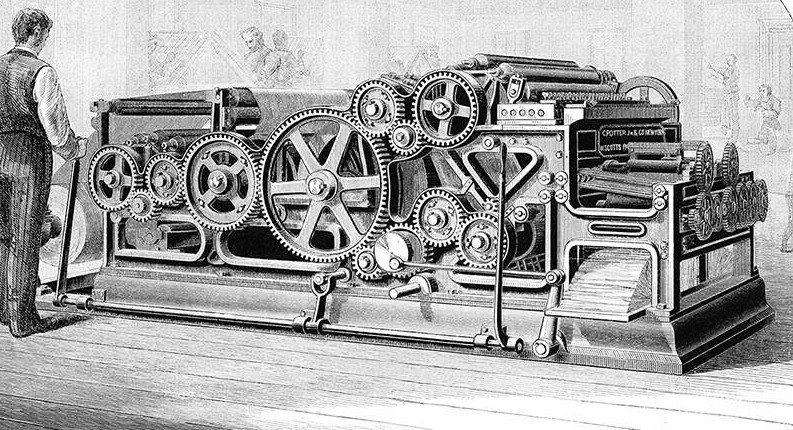
Scalability Problems in the 1800s, I suppose
Even if you are not close to reaching Facebook scale, you could use Python’s asyncio as a more predictable threading mechanism to run many things concurrently. A thread scheduler could interrupt in between destructive updates of shared resources leading to difficult to debug race conditions. Compared to threads, coroutines can achieve a higher level of concurrency with very less overhead.
Misleading Sleep Examples
As I joked earlier, most of the Django async views tutorials show an example involving sleep. Even the official Django release notes had this example:
To a Python async guru this code might indicate the possibilities that were not previously possible. But to the vast majority, this code is misleading in many ways.
Firstly, the sleep happening synchronously or asynchronously makes no difference to the end user. The poor chap who just opened the URL linked to that view will have to wait for 0.5 seconds before it returns a cheeky “Hello, async world!”. If you are a complete novice, you may have expected an immediate reply and somehow the “hello” greeting to appear asynchronously half a second later. Of course, that sounds silly but then what is this example trying to do compared to a synchronous time.sleep() inside a view?
The answer is, as with most things in the asyncio world, in the event loop. If the event loop had some other task waiting to be run then that half second window would give it an opportunity to run that. Note that it may take longer than that window to complete. Cooperative Multithreading assumes that everyone works quickly and hands over the control promptly back to the event loop.
Secondly, it does not seem to accomplish anything useful. Some command-line interfaces use sleep to give enough time for users to read a message before disappearing. But it is the opposite for web applications - a faster response from the web server is the key to a better user experience. So by slowing the response what are we trying to demonstrate in such examples?
Letting them Sleep Would Be Better Idea
The best explanation for such simplified examples I can give is convenience. It needs a bit more setup to show examples which really need asynchronous support. That’s what we are trying to explore here.
Better examples
A rule of thumb to remember before writing an asynchronous view is to check if it is I/O bound or CPU-bound. A view which spends most of the time in a CPU-bound activity for e.g. matrix multiplication or image manipulation would really not benefit from rewriting them to async views. You should be focussing on the I/O bound activities.
Invoking Microservices
Most large web applications are moving away from a monolithic architecture to one composed of many microservices. Rendering a view might require the results of many internal or external services.
In our example, an ecommerce site for books renders its front page - like most popular sites - tailored to the logged in user by displaying recommended books. The recommendation engine is typically implemented as a separate microservice that makes recommendations based on past buying history and perhaps a bit of machine learning by understanding how successful its past recommendations were.
In this case, we also need the results of another microservice that decides which promotional banners to display as a rotating banner or slideshow to the user. These banners are not tailored to the logged in user but change depending on the items currently on sale (active promotional campaign) or date.
Let’s look at how a synchronous version of such a page might look like:
defsync_home(request):"""Display homepage by calling two services synchronously"""context={}try:response=httpx.get(PROMO_SERVICE_URL)ifresponse.status_code==httpx.codes.OK:context["promo"]=response.json()response=httpx.get(RECCO_SERVICE_URL)ifresponse.status_code==httpx.codes.OK:context["recco"]=response.json()excepthttpx.RequestErrorasexc:print(f"An error occurred while requesting {exc.request.url!r}.")returnrender(request,"index.html",context)
Here instead of the popular Python requests library we are using the httpx library because it supports making synchronous and asynchronous web requests. The interface is almost identical.
The problem with this view is that the time taken to invoke these services add up since they happen sequentially. The Python process is suspended until the first service responds which could take a long time in a worst case scenario.
Let’s try to run them concurrently using a simplistic (and ineffective) await call:
asyncdefasync_home_inefficient(request):"""Display homepage by calling two awaitables synchronously (does NOT run concurrently)"""context={}try:asyncwithhttpx.AsyncClient()asclient:response=awaitclient.get(PROMO_SERVICE_URL)ifresponse.status_code==httpx.codes.OK:context["promo"]=response.json()response=awaitclient.get(RECCO_SERVICE_URL)ifresponse.status_code==httpx.codes.OK:context["recco"]=response.json()excepthttpx.RequestErrorasexc:print(f"An error occurred while requesting {exc.request.url!r}.")returnrender(request,"index.html",context)
Notice that the view has changed from a function to a coroutine (due to async def keyword). Also note that there are two places where we await for a response from each of the services. You don’t have to try to understand every line here, as we will explain with a better example.
Interestingly, this view does not work concurrently and takes the same amount of time as the synchronous view. If you are familiar with asynchronous programming, you might have guessed that simply awaiting a coroutine does not make it run other things concurrently, you will just yield control back to the event loop. The view still gets suspended.
Let’s look at a proper way to run things concurrently:
asyncdefasync_home(request):"""Display homepage by calling two services asynchronously (proper concurrency)"""context={}try:asyncwithhttpx.AsyncClient()asclient:response_p,response_r=awaitasyncio.gather(client.get(PROMO_SERVICE_URL),client.get(RECCO_SERVICE_URL))ifresponse_p.status_code==httpx.codes.OK:context["promo"]=response_p.json()ifresponse_r.status_code==httpx.codes.OK:context["recco"]=response_r.json()excepthttpx.RequestErrorasexc:print(f"An error occurred while requesting {exc.request.url!r}.")returnrender(request,"index.html",context)
If the two services we are calling have similar response times, then this view should complete in _half _the time compared to the synchronous version. This is because the calls happen concurrently as we would want.
Let’s try to understand what is happening here. There is an outer try…except block to catch request errors while making either of the HTTP calls. Then there is an inner async…with block which gives a context having the client object.
The most important line is one with the asyncio.gather call taking the coroutines created by the two client.get calls. The gather call will execute them concurrently and return only when both of them are completed. The result would be a tuple of responses which we will unpack into two variables response_p and response_r. If there were no errors, these responses are populated in the context sent for template rendering.
Microservices are typically internal to the organization hence the response times are low and less variable. Yet, it is never a good idea to rely solely on synchronous calls for communicating between microservices. As the dependencies between services increases, it creates long chains of request and response calls. Such chains can slow down services.
Why Live Scraping is Bad
We need to address web scraping because so many asyncio examples use them. I am referring to cases where multiple external websites or pages within a website are concurrently fetched and scraped for information like live stock market (or bitcoin) prices. The implementation would be very similar to what we saw in the Microservices example.
But this is very risky since a view should return a response to the user as quickly as possible. So trying to fetch external sites which have variable response times or throttling mechanisms could be a poor user experience or even worse a browser timeout. Since microservice calls are typically internal, response times can be controlled with proper SLAs.
Ideally, scraping should be done in a separate process scheduled to run periodically (using celery or rq). The view should simply pick up the scraped values and present them to the users.
Serving Files
Django addresses the problem of serving files by trying hard not to do it itself. This makes sense from a “Do not reinvent the wheel” perspective. After all, there are several better solutions to serve static files like nginx.
'Serving simultaneously is not for everyone'
But often we need to serve files with dynamic content. Files often reside in a (slower) disk-based storage (we now have much faster SSDs). While this file operation is quite easy to accomplish with Python, it could be expensive in terms of performance for large files. Regardless of the file’s size, this is a potentially blocking I/O operation that could potentially be used for running another task concurrently.
Imagine we need to serve a PDF certificate in a Django view. However the date and time of downloading the certificate needs to be stored in the metadata of the PDF file, for some reason (possibly for identification and validation).
We will use the aiofiles library here for asynchronous file I/O. The API is almost the same as the familiar Python’s built-in file API. Here is how the asynchronous view could be written:
This example illustrates why we need asynchronous template rendering in Django. But until that gets implemented, you could use aiofiles library to pull local files without skipping a beat.
There are downsides to directly using local files instead of Django’s staticfiles. In the future, when you migrate to a different storage space like Amazon S3, make sure you adapt your code accordingly.
Handling Uploads
On the flip side, uploading a file is also a potentially long, blocking operation. For security and organizational reasons, Django stores all uploaded content into a separate ‘media’ directory.
If you have a form that allows uploading a file, then we need to anticipate that some pesky user would upload an impossibly large one. Thankfully Django passes the file to the view as chunks of a certain size. Combined with aiofile’s ability to write a file asynchronously, we could support highly concurrent uploads.
Again this is circumventing Django’s default file upload mechanism, so you need to be careful about the security implications.
Where To Use
Django Async project has full backward compatibility as one of its main goals. So you can continue to use your old synchronous views without rewriting them into async. Asynchronous views are not a panacea for all performance issues, so most projects will still continue to use synchronous code since they are quite straightforward to reason about.
In fact, you can use both async and sync views in the same project. Django will take care of calling the view in the appropriate manner. However, if you are using async views it is recommended to deploy the application on ASGI servers.
This gives you the flexibility to try asynchronous views gradually especially for I/O intensive work. You need to be careful to pick only async libraries or mix them with sync carefully (use the async_to_sync and sync_to_async adaptors).
Ray Tracer in Python (Part 6) - Show Notes of "Firing All Cores"
When it comes to code optimization, there is an overused statement about Premature Optimization. Here is the rarely-shown full quote:
“Programmers waste enormous amounts of time thinking about, or worrying about, the speed of noncritical parts of their programs, and these attempts at efficiency actually have a strong negative impact when debugging and maintenance are considered. We should forget about small efficiencies, say about 97% of the time: premature optimization is the root of all evil. Yet we should not pass up our opportunities in that critical 3%.” – Donald Knuth
I understand this as not worrying about small optimizations all the time. It is best to focus on the areas which have the most return on (time) investment. Usually you need to do extensive performance measurements to find those areas but there are some natural places to look.
So far, we have been not too concerned about performance especially when it affected readability (else we wouldn’t be writing it in Python). However, in the previous part we got a huge speedup by switching to the PyPy interpreter.
To me the next big opportunity lies in using all the cores. As an experienced Python programmer, I know this means using the multiprocessing module. But I also need to explain why other options, notably Python threads, would not help.
To demonstrate this I wrote a multi-threaded C program, a multi-threaded Python program and a multi-processing Python program - all doing the same thing. What was most entertaining was to watch the GIL in action where it allows only one thread to execute at a time.
Race Conditions
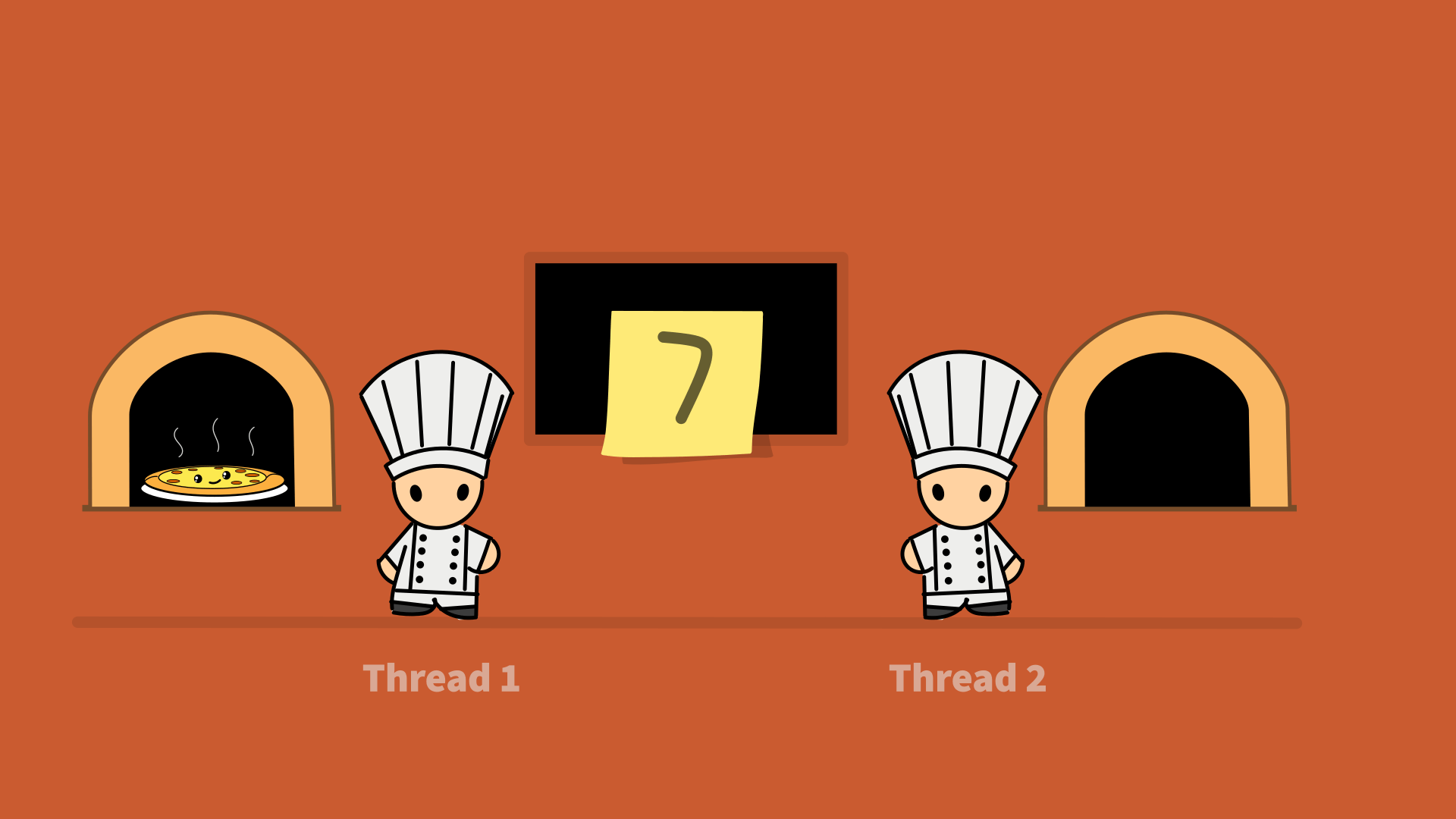
Race conditions are often explained using a bank ATM example. I think it can be explained in a non technical way using many real life scenarios. I wanted to explain it using a cooking example. It’s weird how many asynchronous and parallel concepts can be taught using what we do in the kitchen. So much so that technical job interviews can be made more effective by simply checking your culinary skills (“Sorry we don’t have a whiteboard, just a cutting board for you.”).
Ideally the entire explanation should be animated. My drawing skills are decent but I cannot animate even a bouncing ball. Don’t laugh, just try it. Firstly, there are several cues that any animated object gives which can be only be detected if you watch in slow motion. The Twelve Principles of Animation is a good start.
Secondly, it is a lot of work. A good animator will know how to give maximum expression with the minimum frames. Timing is also crucial in animation. Even a subtle timing error makes animations look janky or confusing. Mere mortals would need to spend days to eventually produce a 5 second clip.
Animating the Race Conditions
So I took the safe approach by showing a slideshow. I think it looks decent. I might post it as a separate clip on Race Conditions so that is doesn’t get lost in this video.
These are the topics we will cover in this episode:
One of the fascinating ways to build a complex system like a computer is to build it from scratch using simple logic gates (a good book which shows how is The Elements of Computing Systems). Same goes for late John Conway’s Game of Life which starts with a simple set of rules but shows very life-like behaviour. This is called Emergent complexity. I guess the only way to understand something that seems complex is to understand its basic principles.
Look carefully at the, by now familiar, image that we will be rendering by the end of this part:
Render of the two balls scene
Notice within the pinkish-purple ball there is a reflection of the red ball reflecting the pink ball. This kind of detailing that unfolds on closer inspection is what gives realistic renders its beauty. Yet it is governed by the most basic laws of Physics like the laws of reflection.
Reflection
The law tells us that the angle of reflection is the same as the angle of incidence. But if we apply it to the world of vectors a rather different looking formula emerges that could be derived from the very same law. The reflected ray is again traced and the process continues.
If you have been following the series closely so far, then you might point out that we have already dealt with this earlier. Yes, diffuse and specular shading are special cases of a material reflecting light. But since we are now considering mirror-like reflecting surfaces it is time to look at the general formula for reflection.
The computation for each pixel will now increase many fold so the overall render time will increase proportional to the maximum depth of reflections we need.
Procedural Materials
A plainly colored object is not quite interesting so you would find even the earliest ray traced images containing a chessboard pattern:
The Compleat Angler (1978) by Turner Whitted
So I introduce a chessboard pattern generated procedurally into the scene. Procedural textures are fascinating and a lot of fun to make. Compared to image textures, they have almost infinite detail. Sort of like analog versus digital.
The chessboard pattern’s formula is easy to guess so it is an ideal introduction. Once you start playing around there is an entire universe of textures to explore with marble, Voronoi and Perlin noise patterns. Some even go to the extend of building entire scenes with only procedural textures. This is deeply satisfying but probably pointless.
Plugin Scenes
Most toy raytracers are happy generating their scene in the main program. But this quickly becomes frustrating when you want to render a couple of examples. The straightforward solution would be to define a scene as data say using JSON and import the scene given as an argument. This is how games like Doom load levels.
JSON, YAML and other configuration languages are deceptively simple to read but you could spend a lot of time writing them due to their tiny quirks with commas and whitespaces. It is also not suited for scenes generated procedurally which is happens quite a bit in ray tracers. You would soon wish if these languages were Turing complete. So I decided to ditch all that and use plain old Python instead.
To be honest, I was not comfortable in allowing a given Python file to describe a scene. But the power and flexibility it allows is really a great tradeoff for the security. I used importlib to import modules inspired by Django.
I can now define a new procedural texture material class inside a scene! This makes the ray tracer quite extensible like a plugin system. I love this approach and look forward to trying this in future projects.
Accelerating Python
Towards the end we see a dramatic 7X speedup of the ray tracer due to the use of PyPy. I also mention my rough rule of thumb to increase Python performance:
Processor Bound? Try Pypy.
IO Bound? Try AsyncIO.
If you are learning to improve the performance of your Python program, this would be pretty bad advice. In that case, make sure you first profile your program and identify the performance hotspots. Then try different ways to optimize those places. After you have tried all that and the performance is still bad, then you can use my rule of thumb for unconventional ways to get great results.
Ray tracing concepts
With this part, I would have covered all the basic ray tracing concepts that I had planned to cover. The next part would be about improving the performance of the ray tracer by using multiple cores.
Many have contacted me asking whether I would be covering topics like Dielectrics, Depth of Field, Anti-aliasing etc. I think there are enough books like Ray Tracing Gems and Ray Tracing in One Weekend which cover all that and much more. If you have followed this series then reading those books would be much easier and you would have a ready implementation to tinker with.
Nevertheless, I may work on a follow-up if people find that useful and time permits. So do let me know.
These are the topics we will cover in this episode:
The first ray-traced animation I had ever seen was in my first year of Engineering. My senior showed us a gold-plated logo of the institution slowly spinning and glinting in the light. It had an amazing level of detail - a triangular frame, a gear wheel on the left, a tower on the right and even a palm tree in the center. We were dying to know how he did it. When he showed us, it blew our minds - it was all code! Every shape was made by combining (or subtracting) primitive solids like spheres, cylinders and cubes. It featured on the masthead of the first edition of our online magazine (distributed on 3 1⁄2 inch floppies).
Of course, these days 3D modelling is mostly done by artists in a graphics program like 3ds Max or Maya. But not everything is tinkered by the hand of an artist. Procedural code is still used to create thousands of unique soldiers in an army scene or an infinite world in a multiplayer game. Computer generated art can often surprise or amuse you.
So when I had to design the model of the omnipresent SAR-Cov-2 virus for a poster, even though I was very tempted to use such tools, I opted to generate the model in code. My Python raytracer (currently in it’s fourth part of the video series) was decent enough to create 3D looking spheres. Having only spheres is a big constraint but you can be more creative under constraints.
Deconstruction
There is a process fundamental to artistically recreating any real world object – Deconstruction. When you learn to draw you are asked to “block out” the simple shapes you are trying to draw. So a face becomes an elongated sphere, a nose becomes a triangle etc. If your big shapes are correctly proportioned then it will be a lot easier to add in the details.
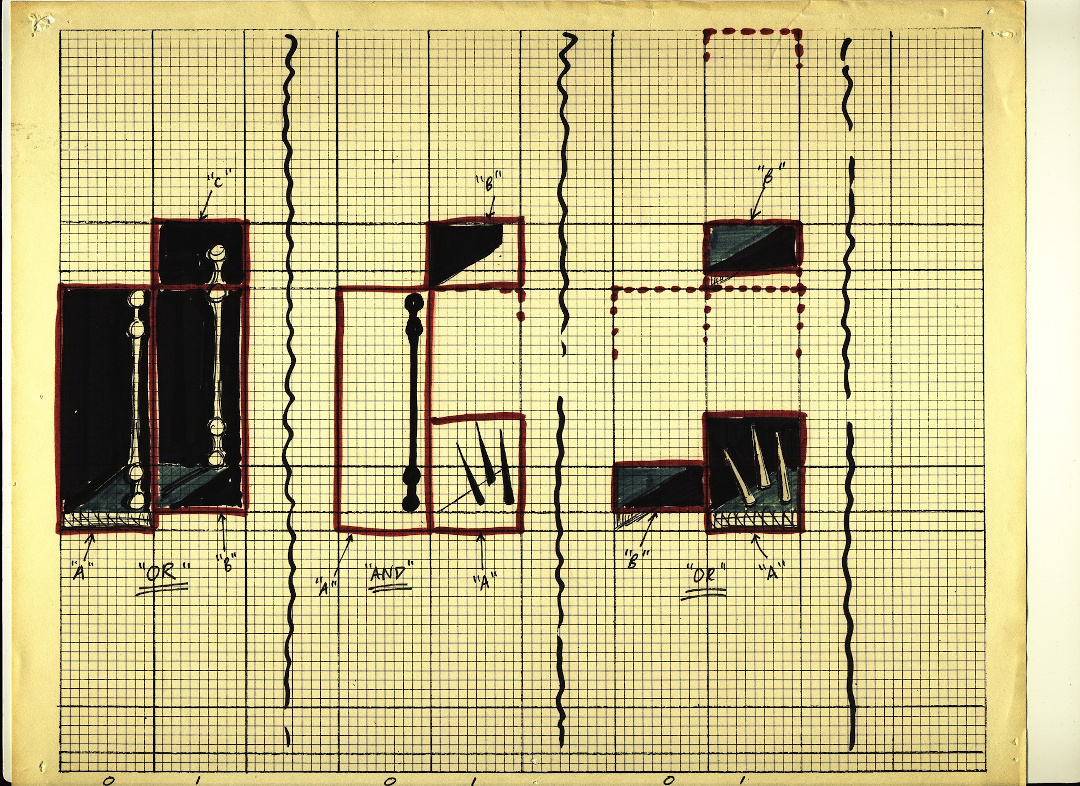
In good old days, the computer artists used graph paper. Like my senior who traced the logo from the college magazine, enlarged it on graph paper and wrote down all the coordinates. These days you could use a 2D drawing program like Inkscape to overlay a photograph and trace over it. But the idea is essentially the same - find all the large blocking shapes that make your image.
Graph paper sketch of Prince of Persia by Jordan Mechner in 1987
Reconstruction
Generating the model in the computer can be a process of trial and error. In the days of slower computers, rendering a simple object took nearly an hour. Even with today’s dramatically faster machines, rendering a complex scene could take hours. There is simply a ton of numbers to crunch.
In the case of the coronavirus, I needed to figure out how to make a crown. Essentially I needed to position points evenly around a circle. People say a lot of things about high school trigonometry and how much of a waste of time it was. But I found it quite useful not only to arrange the spikes of the crown but also give it a slight random shift. This would mean each time you render the virus would look sightly different. I had a lot of fun animating several renders to a beat in the video.
Presentation
I couldn’t stop playing with the model even after the poster was made. I tweaked it into various color combinations that I found online. Ironically, it looks distinctively charming in any avatar.
It shows that simple things are awesome than the most professionally done creations. Especially if you could make your own. Looking forward to seeing what others would create with this.